The two ways to register, and what to check first
There are two ways to register with BTC9188. Use the “Register on Binance with this invitation” button in the next section, which opens Binance’s signup page with BTC9188 already attached, or open the official signup page yourself and type BTC9188 into the referral-code field if the form shows one. Either way, sign up with an email address or phone number you control, enter the verification code Binance sends you, and check that BTC9188 appears as the referral before you confirm. Identity verification comes after the account is created.
Before you start, check that Binance supports your real country of residence and the service you need, such as a particular payment method. A signup page that opens is not proof of support. Do not use false residency information or another person’s identity. Reading a Chinese, English or Georgian page does not establish eligibility.
Resolve uncertainty with official support before funding the account. We do not promise successful registration or payment for any particular region or card.
Understand the referral relationship
Using the link below: it already carries Vexdu’s code, BTC9188. Check the referral information or confirmation offered by Binance. A code in the URL is not proof that it is linked to the account. Check again if the flow moves from the website to the app; opening a link alone does not confirm a referral.
Opening official signup yourself: if that flow offers a referral-code field, enter BTC9188 without extra spaces or typos. This is a referral code, not the verification code sent to your email or phone. Signup methods may use different screens; this guide does not assume the field appears at a particular step.
No referral or benefit information visible? Read the invitation guidance for that flow. If it remains unclear, ask official support whether it can link BTC9188 and how to check the trade rebates of up to 20%. A missing field does not establish a benefit. Do not assume a code can be added or replaced after signup; existing accounts must follow their applicable rules.
BTC9188This is how Binance’s signup page describes accounts registered through our link or with BTC9188 (checked 2026-11-11). 20% is a cap; eligible products and conditions are shown in your account.
After registration, check your account’s task center. Complete the requirements and claim rewards under the displayed eligibility, deadlines and reward terms.
We may earn commission from an eligible referral through this link or code. Products covered by rebates of up to 20%, account eligibility and task rewards depend on Binance’s interface and campaign terms.
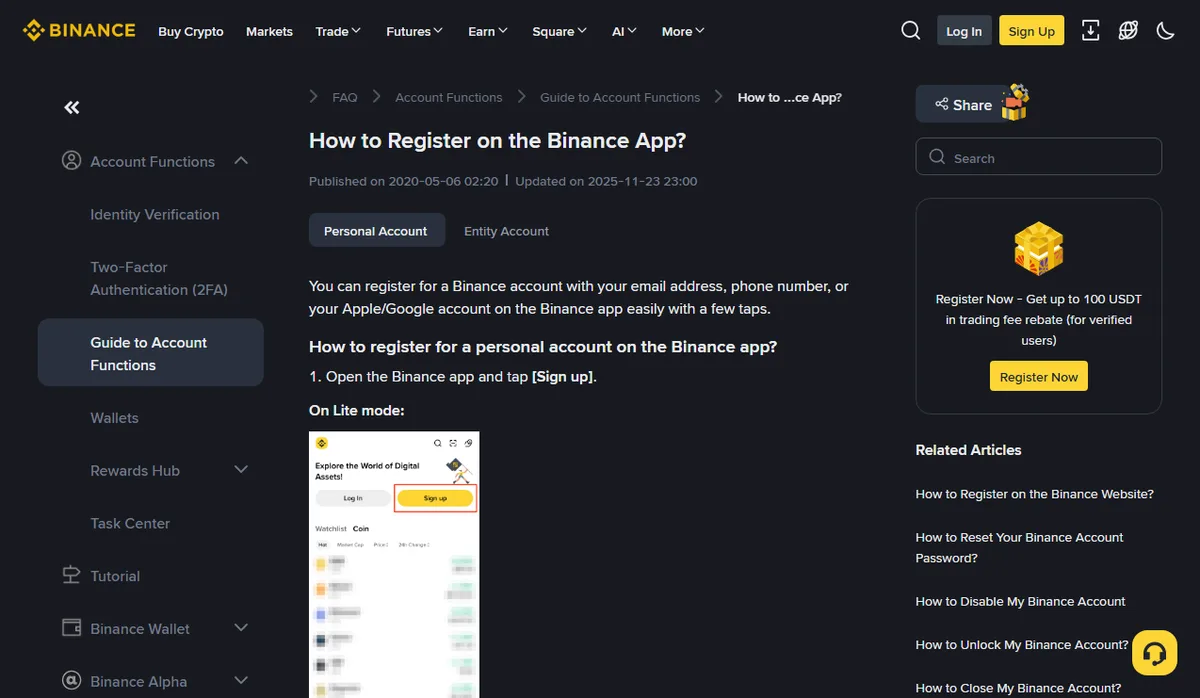
Official documentation · Binance · Account registration
Work through a short checklist
- Use an official source for signup. Check the domain and app publisher.
- Use an email address or phone number you expect to retain, following the current interface.
- If using an invitation, check its code, linked status and actual terms on the official page before confirming.
- Complete required identity checks truthfully through the official process.
- Enable two-factor authentication, save recovery information and check the payment options and limits you need.
Never send verification codes, passwords or identity documents to this site. If you already have an account, check the applicable rules rather than creating another account to obtain an offer.
How trade rebates of up to 20% and task rewards work
Fee reduction: eligible accounts using our link or code BTC9188 may receive trade rebates of up to 20% on qualifying trading fees. This is not 20% off the purchase principal, and does not mean bank charges, spreads or withdrawal costs are reduced. Check the covered products and rates in your account.
Task rewards: after registration, open the task center from your Binance account menu. Check your tasks, deadlines and claiming conditions. Complete qualifying requirements, then check the task or rewards page for issuance and claiming. Tasks may differ by account, region, invitation mode and campaign.
A task reward may be a trading fee rebate voucher. It refunds eligible fees under its terms rather than paying its face value as immediate cash. Check claim and use deadlines, covered products and rebate percentage. The trade rebates of up to 20% and vouchers are separate mechanisms: do not add their percentages together or assume they can be combined.
Choose tasks that fit your intended use. Do not add trades or open futures positions solely to meet a volume target. A voucher’s face value does not establish net profit from a task.
We do not show a task-center example here: the amounts, volume targets and countdowns on that page belong to one account and one campaign, so they say nothing about what your account will be offered. Read your own task page and the voucher terms in the official article below.
Official documentation · Binance · Trading fee rebate vouchers
This is a regional platform page; it does not establish eligibility in Georgia or other regions.
If invitation information is unclear before confirmation
Entering or copying BTC9188 does not itself prove that the platform established a referral relationship. Check the invitation information shown in the actual registration flow and the account's own records. If the field is absent or the displayed benefit differs, ask official support about eligibility and how association is confirmed before assuming it can be repaired later.
An existing account may have different conditions from a new registration. Do not create additional accounts merely to repeat an offer. This site cannot change an established relationship or promise that a prior account can receive a retrospective benefit.
A fee example, not a discount on the money you buy with
If an eligible trade would otherwise incur a fee of 10 and the account receives the full 20%, which is the upper limit, that fee becomes 8: the reduction is 2. A lower rate saves less, and an account that does not qualify saves nothing. A purchase principal of 1,000 does not become 800. A bank charge, price spread or later withdrawal cost needs its own treatment.
Read the covered product, base fee and benefit treatment in the account. If another discount or voucher is present, verify how the rules interact rather than adding percentages. Where a quote already reflects the reduction, entering its actual payment and net quantity in the calculator does not require another manual deduction.
When a verification message does not arrive
Work out which step failed before pressing resend again.
- No email code: check the address on the form for a typo, then look in spam, junk and any promotions or filtered folders. If your mail provider or a work domain filters automated mail, allow messages from binance.com and request one new code.
- No SMS code: check the country code and that the number is not entered with the country code twice or an extra leading zero. Make sure the phone has signal and that a spam filter or blocking app is not hiding messages from unknown senders.
- Code arrives but is rejected: it may have expired or been replaced by a later request. Enter only the most recent code, without spaces.
- Resend is greyed out or the page reports too many attempts: wait until the countdown or restriction shown on the page ends rather than retrying repeatedly.
- Still nothing after these checks: contact support through the help center reached from the official site, giving the exact error text and the time of the attempt. Ignore anyone who contacts you first offering to fix it.
Keep the exact error message so you can identify what happened. This guide promises no universal waiting time and does not need a screenshot of a verification code.
Keep control of the associated email or phone. Do not let a stranger receive codes or create the account for you. Use different passwords for the account and its email, then review the security options offered by the account. If you reached a registration form through an unfamiliar message, close it and enter through an official address you have independently checked.
Registration is not a reason to rush a purchase
Return to your intended payment method and obtain a fresh quote. A discount may affect only a particular trading fee, leaving bank charges, price differences or withdrawal costs unchanged. Compare only benefits you can verify; do not include an invisible discount in the calculation.
If verification fails, read the actual reason, check consistency and contact official support when necessary. Do not pay someone promising guaranteed approval. Even with an account ready, you can wait or decide not to buy when terms are unsuitable.