Is Binance Convert cheaper than Spot? Count the coins, not the fee line
You have 500 USDT and want another coin. Binance gives you two obvious routes. Convert: type the amount, glance at what you'll receive, confirm. Or open the Spot trading page and place a market order. Convert advertises no fees and Spot takes a cut on every trade, so it looks like there's nothing to compare.
There is, though, because each route hides its cost somewhere different. Convert doesn't add a fee, but the rate it quotes isn't the last traded price on the order book. Spot does charge a fee, while the price you actually pay depends on how deep the order book is. The only figure both have in common is the end result: for the same 500 USDT, how many coins reach your account. Divide 500 by that and you have your real cost per coin.
The amount on the Convert preview is the whole story
Binance's Convert FAQ is blunt about it. Question 1: "There are no fees for using Binance Convert." In Market mode, "the quoted amount of assets shown is the actual amount of assets you will receive in your account once the conversion is executed."
Question 9 explains why that quote won't match the last price you see on the exchange. The last traded price leaves out trading fees and ignores the size of your trade. Convert prices your order from current market conditions, and nothing is charged on top of the quote.
So on the Convert side you don't hunt for a fee anywhere. The preview amount is what lands in your account. It only holds while that quote is live, though. Once it refreshes the number can shift, so the figure worth noting is the one on screen when you press confirm. Why did the quoted received amount change? walks through what moves it.
Official source · Binance · Convert FAQ (checked October 2026)
Spot market buys: the average fill price and the 0.1% fee go together
Spot takes two steps to work out.
First, the average fill price. A market buy starts at the best ask and climbs through the sell orders above it. If your amount is small next to the visible depth, the average sits close to the best ask. If the order is large relative to the book, or the coin simply trades thinly, each level you eat pushes the average up. Partial fills: average price and net amount shows how to weight several fills.
Second, the fee. On Binance's Spot & Margin fee table, a Regular User pays 0.100% maker / 0.100% taker, and paying with BNB takes 25% off, which gives 0.07500%. A market order matches resting orders immediately, so the taker column is the one that applies. The table moves with platform updates and with your own VIP level, so read the rate shown for your tier before you do the arithmetic.
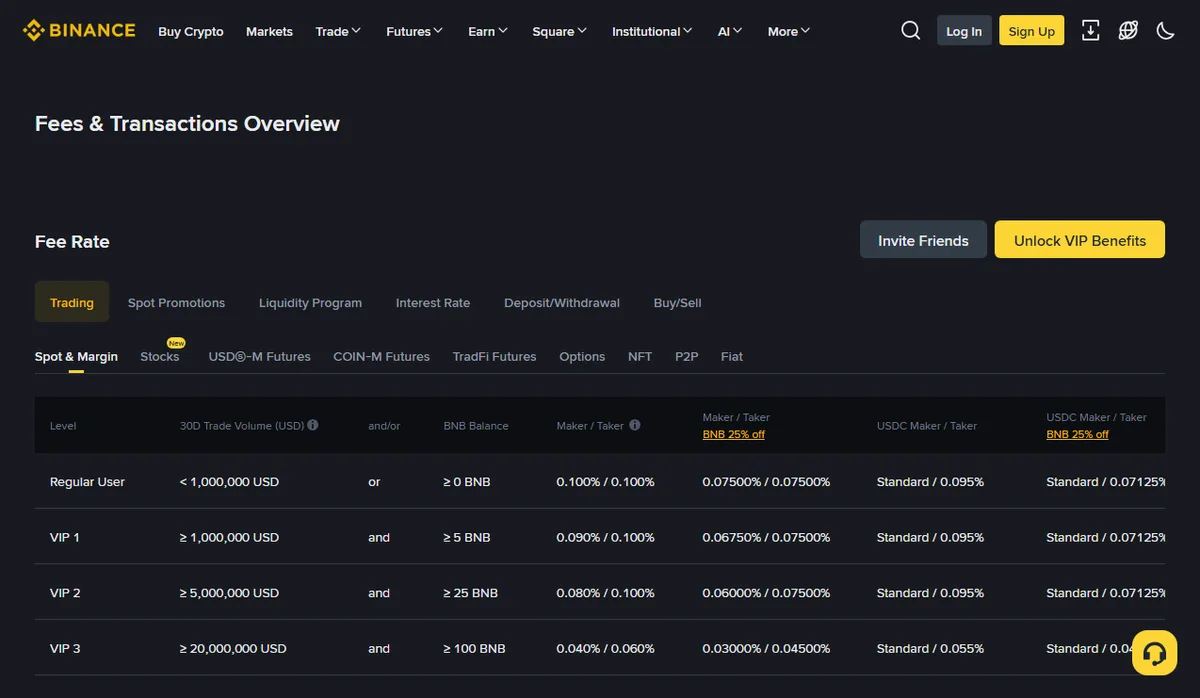
October 2026
Which asset the fee comes out of changes the count you're comparing. Without BNB fee payment, the fee on a buy is normally taken from the coin you bought, so you end up with 0.1% less of it. With BNB enabled, the coin amount stays whole and a little BNB leaves your account instead; convert that BNB into USDT and add it to your cost. The fee column in your trade history names the asset. Which currency paid your trading fee? covers how to record each case without counting it twice.
One more line on the same page: the 30-day volume used for VIP levels includes spot volume from Spot, Margin, Convert and other products. Choosing Convert doesn't cost you volume, so you can leave that out of the comparison.
Official source · Binance · Spot trading fee rates (checked October 2026)
Worked example: a thin order book flips the answer
These numbers are made up to show the arithmetic. Both routes spend 500 USDT. The Convert preview offers 4.9900 coins. The Spot market order fills at an average of 100.05 when the book is deep, or 100.40 when it's thin. Fees use the Regular User taker rate of 0.1%, or 0.075% with BNB.
| Route and condition | Coins received | Paid on top | Cost per coin (USDT) |
|---|---|---|---|
| Convert, Market mode | 4.9900 | None | 500 ÷ 4.9900 ≈ 100.200 |
| Spot market, avg 100.05, fee in the coin | 500 ÷ 100.05 × 0.999 ≈ 4.9925 | None | ≈ 100.150 |
| Spot market, avg 100.05, fee in BNB | 500 ÷ 100.05 ≈ 4.9975 | About 0.375 USDT of BNB | 500.375 ÷ 4.9975 ≈ 100.125 |
| Spot market, avg 100.40, fee in the coin | 500 ÷ 100.40 × 0.999 ≈ 4.9751 | None | ≈ 100.500 |
With a deep book, Spot gives you 0.0025 more coins than Convert — roughly 0.25 USDT at this price — and a bit more again with BNB fees. When the book is thin and the average climbs to 100.40, Spot ends up about 0.015 coins behind.
Neither route is always cheaper. Same moment, same amount: whichever puts more coins in your account wins.
How to check both before you trade, and three conditions beyond the number
Convert hands you its number in the preview. Spot only tells you the exact average after the order fills, so beforehand you estimate. When your amount is small compared with the depth, "amount ÷ best ask × 0.999" gives a fair estimate of what you'd receive; set it beside the Convert preview. If the order would eat through several ask levels, weight those levels by size, or drop both sets of numbers into the quote comparison tool.
If the gap comes to a few tenths of a USDT and you only swap now and then, paying it in exchange for not reading the order book is a reasonable trade. The bigger the amount and the less liquid the coin, the further apart the two routes can drift, and the more that second look is worth.
Three conditions decide whether you actually get that number:
- Minimum and maximum size. The Convert FAQ says limits depend on the coin or pair and can be previewed before you enter an amount. Spot has its own minimum order rules. For small amounts, make sure both routes will accept the order.
- Convert's Limit mode isn't guaranteed to fill. Binance notes that Limit orders execute based on market conditions and may not complete even if the market briefly touches or crosses your price. Comparing a Convert limit price with a Spot market fill means comparing against a price you might never get.
- Which account the coins settle into. Convert settles into whichever wallet you selected, Spot or Funding. Binance’s Convert FAQ says settlement usually occurs immediately, or in some cases up to a few minutes after you confirm the trade. A Spot order fills into the Spot account. If the coins seem to be missing, start with Bought crypto on Binance but it's not in Spot?