Which step said “successful”?
A “successful” pop-up after paying may only mean the payment went through. Whether the crypto reached an account is shown by the order status, not by that message.
Where to find the card order depends on whether you bought on the website or in the app, and the two guides use different menu names:
- Website. Binance’s web guide for card purchases gives the order list as [Buy & Sell] - [Orders], or [Fiat Order] - [Buy]. Its section on failed orders names the entry differently, [History] - [Fiat Order]: find the order marked “Failed”, click the [i] next to it for the [Unable to Process] explanation, and use [Inquiry] there to contact support. The same guide uses both names, so follow whichever one your website menu shows.
- App. The app guide sends you to [History] for order status. For a failed order it points to [Fiat History]: open the order for the failure reason, then tap the CS button to reach support.
P2P follows its own path. After you mark the order as paid it moves to “Releasing” and waits for the seller. According to the official P2P guide, the crypto appears in your Funding Account only once it has been released. Until then it sits in escrow, and no wallet page will show it.
If the order is not complete yet, there is no balance to look for.
Official sources · Binance · Card purchase on the website (updated 2025-12-09)
Binance · Card purchase in the app (published 2020-08-10, no update date shown)
Binance · Buying via P2P in the app (updated 2026-03-13)
The entry point decides the account
One exchange login holds several accounts. A spot order can only use the available balance in the Spot account, which is why the order form can say “insufficient balance” right after a purchase went through.
Scroll the table sideways; arrow keys work too.
| How you bought | Account named on the help page | Page last updated |
|---|---|---|
| Card purchase in the app | Spot (“credited to your Spot Wallet”) | No update date shown (published 2020-08-10) |
| P2P purchase | Funding | 2026-03-13 |
| Received via Pay or a gift card | Funding | 2025-11-28 |
| Convert | Whichever you selected: Spot, Funding or Flexible Savings | 2026-04-20 |
These pages were updated on different dates, and regional or app versions may not match each other. Read the table as where to look first, not a guarantee. If the first account is empty, open the other one too.
The Convert row has one more variable. The order form has a wallet selector that switches between Spot and Funding, and the FAQ says settlement is usually immediate but can take up to a few hours. Suppose you converted into USDT with Funding selected: nothing new appears in Spot, and nothing has gone wrong.
Official sources · Binance · Convert FAQ (updated 2026-04-20)
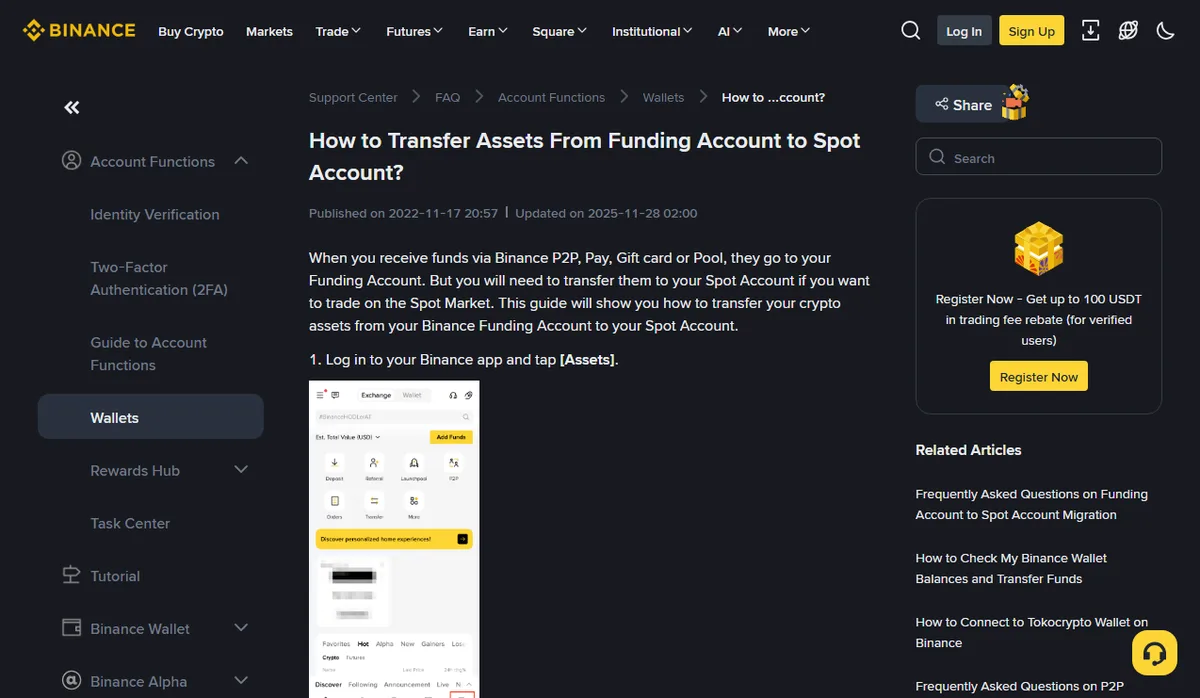
Binance · Transfer from Funding to Spot (updated 2025-11-28)
Found it in Funding: move it to Spot
The app path in the official guide is [Assets] → [Overview] → [Transfer], choose [Spot] as the destination, enter the amount and confirm.
September 2026
Before confirming, read three fields: from, to, and which coin. Pick the wrong direction and the same symptom simply moves to the other account.
Then go back to the spot order form and check the available amount. If it has not changed, open the transfer record and look at its source, destination and status.
A transfer moves coins between your own accounts; the total you hold on the platform stays the same. Keep it out of your purchase-cost sheet, or your average cost will come out too low.
It is there, the page just isn't showing it
Sometimes the coins are already in the account and the screen you are looking at simply does not display them.
- Balances are hidden. The wallet overview guide says the eye icon shows or hides balances. Masked figures are not a zero balance.
- You are reading a valuation. The top of the overview shows an estimated total in BTC and your chosen fiat (USD by default), which Binance calls approximate. It moves with prices even when the quantity does not.
- You are in the wrong view. The overview adds up all accounts; a single account page shows only that one. Visible in the overview but not in Spot usually means it landed elsewhere, so go back to the transfer step.
If you found the coins but fewer than expected, that is a different question. Received less crypto? splits it into quote, fill and credit.
Official source · Binance · Check wallet balances and transfer funds (updated 2025-12-09)
Nothing in either account, and the order isn't pending
At this point the simple explanations are gone and it is time to contact support. Have these ready:
- the order number and the exact status text shown on the order;
- payment method and payment time, with the time zone;
- the bank or payment reference, and whether the charge is posted or still pending.
For a failed card order, ask through the [Inquiry] button in the failure details on the website, or the CS button on the failed order in the app, so the question is tied to that order. If a P2P order stays in “Releasing”, keep the conversation and any dispute inside the order page rather than moving it to a private chat.
When your card was charged but the order failed, the refund timing is set by the card issuer and payment provider; there is no single number of days to quote. For a charge that differs from the order, see Card charged more than the crypto order?. To lay out records so support can find the same order, see Prepare crypto purchase records for support.