Two records, two wordings
The Binance order says failed. Your banking app says something else: a pending line, a posted charge, or nothing. Neither screen is wrong. They describe different steps, so copy both before deciding where the money is.
On the Binance side, the website card guide points to [History] - [Fiat Order]. Click the [i] next to the failed order and the reason sits under [Unable to Process], with an [Inquiry] button in the same panel. The app guide uses [Fiat History] instead: open the failed order to see why.
On the bank side, note the amount, currency, time, reference number and, above all, the exact status word. That one column decides most of what follows.
Official source · Binance · Card purchase on the website (page shows updated 2025-12-08; read October 2026)
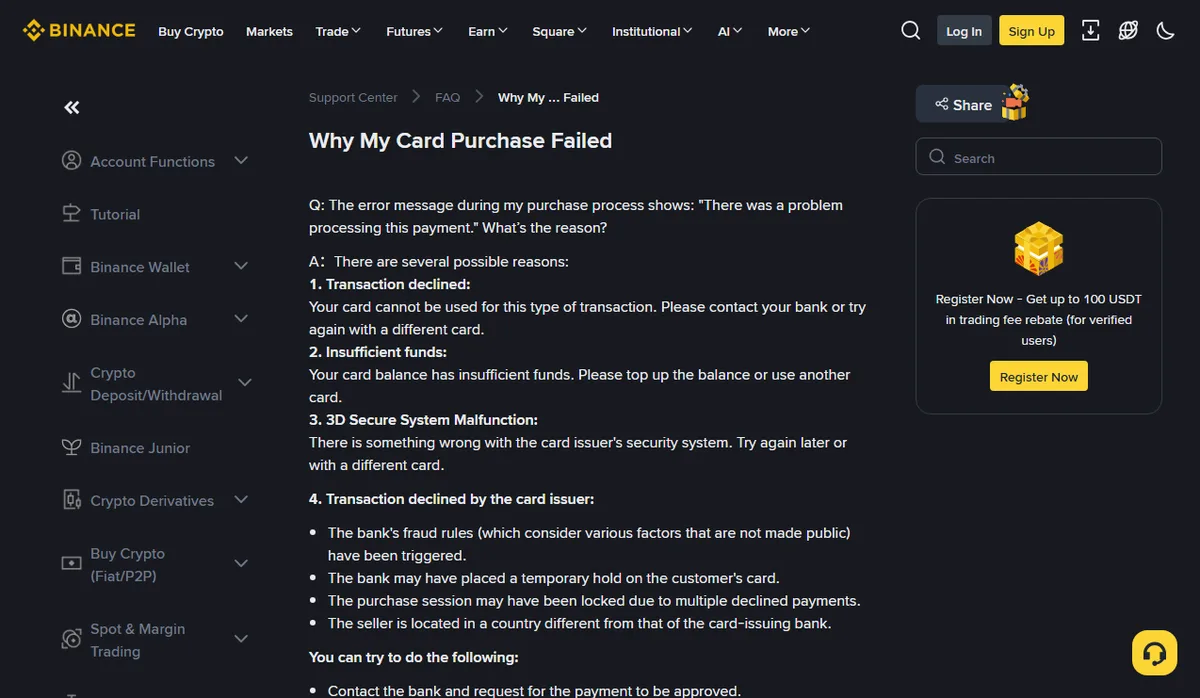
The four reasons behind “There was a problem processing this payment”
Binance Support has a short page for exactly this message, titled “Why My Card Purchase Failed”.
October 2026
The page lists them in its own order. Sorted by who can actually fix each one, they read like this:
- Insufficient funds. The only one you can solve on the spot: top up or use another card.
- 3D Secure System Malfunction. The 3D Secure check itself failed. The page suggests trying later or with a different card.
- Transaction declined. The card can’t be used for this type of transaction. Ask the bank, or switch cards.
- Transaction declined by the card issuer. The broadest bucket. The page names four possibilities: the bank’s unpublished fraud rules fired, the bank put a temporary hold on the card, repeated declines locked the purchase session, or the merchant sits in a different country from the issuing bank.
For the last two, nothing on the Binance side will change the outcome. The page’s own suggestions are to ask the bank to approve the payment, wait and retry, or use another card.
Official source · Binance · Why My Card Purchase Failed (no update date shown; read October 2026)
Before you press retry again
Hitting retry several times in a row feels harmless. The same support page says otherwise: multiple declined payments may lock the purchase session, and after that each attempt just adds another failure.
It can add lines on the bank side too. Whether every attempt gets authorised is up to your issuer; if it is, the app may show several pending items for the same amount, which looks like you paid more than once.
Adding cards has its own limit. According to the website guide, adding too many cards at once may trigger a 24-hour wait. That wait covers binding only; a card already on file still works. Cycling through every card in your wallet is not free either.
A better sequence: read the failure reason first. Insufficient funds? Top up and try once. An issuer decline? Call the bank, get the payment cleared, then place a fresh order.
Pending, posted or nothing at all
Match the status you copied in section 1 to one of three cases.
- Nothing in the banking app. The decline happened at authorisation. No money moved.
- A pending item. The bank has reserved that amount but nothing has settled. It reduces what you can spend, yet it is not a payment to the merchant. When it drops off is the issuer’s call, so ask the bank for its timeframe rather than guessing a number of days.
- A posted charge. Money actually left, but the order failed. The FAQ on Binance’s card guide is direct about this: if payment was deducted for a failed transaction, it is refunded to your card, and the refund may take a few days to appear on your statement.
Cases 2 and 3 often differ by a single word with an identical amount. How to tell a pending line from a posted one, and how to avoid adding them together, is covered in card charged more than the order, so it is not repeated here.
When the refund lands, tie it back to the failed order number. If a currency conversion sat in between, the amount returned in your own currency may not match the original charge to the cent; ask the bank how it converted before labelling the gap a platform fee.
Official source · Binance · Card purchase on the website, FAQ “Transactions” item 2 (read October 2026)
A different card can mean a different total
The first card was declined, the second one went through. Your cost may have changed along with the card.
Item 3 in the same FAQ says some banks classify crypto transactions as quasi-cash payments and charge an extra fee for them; if that happens, the page tells you to ask your bank why. That fee is not in the Binance quote, so the confirmation screen won’t show it. Before switching, two questions for the new card’s issuer are worth a call: how will this purchase be categorised, and is there a separate fee?
The same logic applies if you move away from cards altogether. Card, P2P and depositing fiat first all put their costs in different places; buying crypto with GEL walks through those routes. What you are really comparing is how much crypto arrives for the same money out. Put the total paid and the expected amount for each route into the quote comparison tool rather than comparing fee rates alone.
Bank or Binance: who to ask
Sort it by where the money is stuck.
- The order failed and the bank shows a pending or posted item, and you want to know when it comes back: ask the card issuer, quoting the bank reference and amount.
- The failure reason is vague, or a posted charge has not come back after the period the bank gave you: open the failed order and use [Inquiry] (in the app, contact support from the failed order page) so Binance sees the exact order.
- The order actually succeeded but the coins aren’t where you looked: that’s a different problem, covered in bought crypto but it’s not in Spot.
Whoever you contact, send the order number, the failure reason as written, the bank status as written, the reference number and the time with its time zone in one message. Preparing purchase records for support shows a layout that keeps them together.