Two things to check on the order page first
Say you placed a buy order on Binance P2P, sent the money to the account the seller listed, and the order has been sitting on the release screen ever since. Before you appeal, look at two things on that order.
Did you actually tap [Mark as Paid]? Some screens call it [Transferred, Next]. Until you do, the seller still sees an unpaid order, and the countdown will cancel it. Binance's own post on P2P appeals covers the case where you forgot and the order expired: contact customer service with the order number and your proof of payment.
And once you have paid, leave the cancel button alone. Rule 1 of the buyer section of the appeal handling rules says that if an order is cancelled after the buyer paid, whether by timeout or by mistake, support will contact the seller for a refund on a best effort basis. If the seller refuses, Binance is not liable for the loss. Cancelling turns a release you are owed into a refund the seller may or may not send.
Official source · Binance Blog · All You Need to Know About the Binance P2P Appeals Process (published 2021-01-20, checked October 2026)
How long the seller has: instant and non-instant payments use different clocks
Rule 3, “The seller did not release the crypto in time”, splits the answer by payment method.
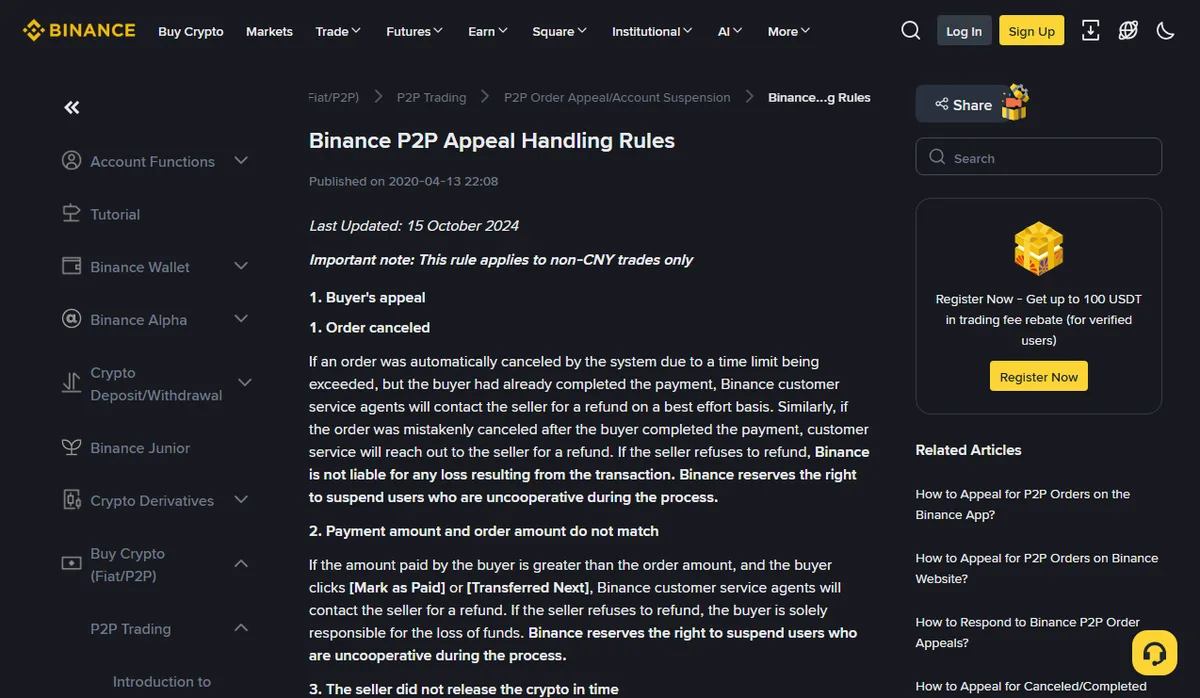
October 2026
- Real-time payment method. If the seller has not released within 15 minutes of a successful payment, support contacts the seller. If the seller doesn't respond within a set time, support can release the crypto manually.
- Non-instant payment method. The seller may not see the money straight away, so support asks for release within two working days. If the payment still hasn't arrived by then, it is the seller who has to report it; if they don't, the payment is treated as received and support releases manually.
Work out which one you used. With a transfer that has to clear between banks, a seller saying “not received yet” may simply be telling the truth. With an instant transfer, the 15-minute mark is a concrete time you can put in your appeal.
The screenshot also shows a line that is easy to scroll past: these rules apply to non-CNY trades only.
Every time limit quoted here — the 15 minutes and two working days above, the 10 and 5 minutes in the next section — is copied from those official pages, and Binance can change them. Open the pages again before you appeal and go by whatever they show at the time.
Official source · Binance · P2P Appeal Handling Rules (page says last updated 2024-10-15, checked October 2026)
Six records to keep before you open an appeal
The appeal form only asks for a reason, a description and screenshots. What lets support decide is a set of records that agree with each other:
- Order number and a screenshot of the order. It should show the seller's payment details, the order amount and the status after you marked it paid.
- Proof of payment. Binance's appeals post says it should show the payee's name, the account details, the time and the amount. A “transfer submitted” screen is weak; the transaction detail page or e-receipt from your banking app, with a status like completed or posted, is much better.
- The payee account matches. Compare the name and account number on your proof with the payment details in the order, character by character. The rules say that if you pay any account other than the one specified, or a third party, Binance is not liable for the loss and a refund is not guaranteed. A seller who sends a “new account” in chat is asking for exactly that.
- The amount matches. Under rule 2, if you paid more than the order amount, support will ask the seller to refund the difference; if the seller refuses, the loss is yours. Split or top-up payments make your proof disagree with the order, so list each transfer with its time and amount.
- The in-order chat. The appeals post asks you to keep all communication in the P2P chat box so support can follow it. Phone calls and outside messaging apps are invisible to them.
- The payment remark. The rules have a separate clause for remarks containing words such as “digital currency”, “C2C/P2P”, “Binance” or “BTC”, and say any fees incurred during the refund are covered by the buyer. Capture the remark field with your proof and check what it says.
For turning all this into one message support can match to a single order, see preparing purchase records for support. Items 3 and 6 are the parts specific to P2P.
What happens after you tap [Appeal] in the app
Binance's app guide for appealing a buy order goes like this: on the releasing page tap [Help], tap [Appeal], then [Customer Service] and pick your issue. Choose a reason, write a detailed description and upload screenshots.
The order then shows [Appeal Submitted] and the counterparty has 10 minutes to respond. If they don't, or if they report that negotiation failed, the status moves to [Under Review] and support takes over. Those 10 minutes are for answering the appeal; the 15 minutes in rule 3 are for releasing. Different clocks.
Two easy slips. Cancel the appeal by mistake and you have to wait 5 minutes before you can submit again. And if you and the seller agree in chat, the guide has you tap [Cancel Appeal] and wait for the release, which means starting over if the crypto never comes. Get the seller to write the promise in the order chat before you cancel, not just say it on a call.
Official source · Binance · What's the appealing process on Binance P2P (App) (page updated 2026-04-06, checked October 2026)
After the appeal: where the crypto went, how much money came back
There are two outcomes, and each has one thing to reconcile.
If the seller released, P2P purchases land in the Funding account, not Spot. If the order says completed and Spot shows nothing, follow bought crypto but it's not in Spot to check the account and any transfer.
If the order was cancelled and you are waiting for a refund, remember what the rules actually promise: support contacts the seller. The money comes back from the seller's account, not from Binance. When it arrives, match the bank entry to the original order number. If the transfer crossed banks or currencies, the amount returned may not equal what you sent; ask the bank about the gap first.
Then cost the purchase honestly. Crypto that took two working days and a bank transfer fee to arrive should carry that fee when you compare it with a card purchase. Put both routes' total payment and amount received into the quote comparison tool; buying crypto with GEL shows where each payment method charges.