Binance withdrawal completed but not received: start with the TxID
A TxID, also called a transaction hash, is the long string of letters and numbers the blockchain assigns to each transaction. Binance's help article "How to Find My Transaction ID (TxID)?" gives two ways to find it:
- On the website: click [Wallet], choose [Overview] from the drop-down, then [Transaction History]. The ID sits in the [TxID] column of the withdrawal row.
- In the app: [Assets] → [Spot] → [Transaction History], then tap the withdrawal.
Depending on which version of the companion article on transaction status you open, its website path starts from [Assets] or from [Wallet] (the screenshot below shows [Wallet]); both lead to the same history list. The TxID itself is a link: clicking it opens the explorer for the network you picked when withdrawing. Binance's own examples are Etherscan for ERC20 and BscScan for BEP20.
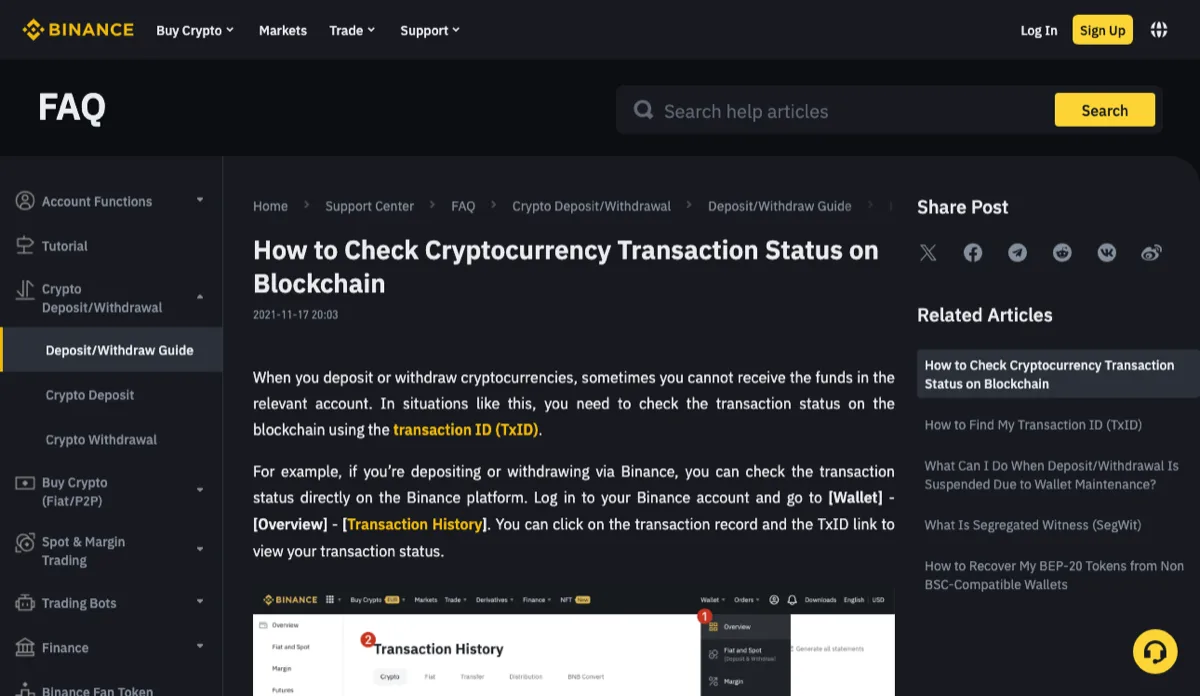
November 2026
If there is no TxID in the record yet, the coins have not actually been sent, and searching your wallet won't help. TokenPocket's help page puts this check first: no hash means you go back to the sender, which here is Binance support.
Official sources · Binance · How to Find My Transaction ID (TxID)? (updated 2025-12-19, checked November 2026) · Binance · How to Check Cryptocurrency Transaction Status on Blockchain? (updated 2025-12-19, checked November 2026)
Reading the explorer: Fail, Dropped & Replaced, waiting for confirmations, Success
An explorer page has a lot of fields. The one that matters first is Status. Binance's status article walks through a few cases per network; the table puts each one next to who can actually help.
Scroll the table sideways; arrow keys work too.
| What the explorer shows | Where the transfer stands | Who to contact |
|---|---|---|
| Ethereum (ERC20) or BSC (BEP20): Status is Fail | The transfer did not go through | Whoever sent it. For a Binance withdrawal, Binance support; the receiving side cannot fix it |
| Ethereum or BSC: Dropped & Replaced | The pending transaction was replaced by a new one with a higher gas fee | Ask Binance for the new TxID and check that one |
| Bitcoin: fewer confirmations than the explorer requires | Not fully confirmed yet | Wait; Binance notes the required number can change |
| Tron (TRC20): CONFIRMED, result FAIL | The transaction is on chain but the funds could not be credited | The sender, i.e. Binance |
| Success / SUCCESS, or Bitcoin fully confirmed | The on-chain part is done | The receiving wallet or platform; if it still shows nothing, read the next section |
One case the table does not cover: the explorer finds nothing at all for your TxID. Check that you are on the explorer for the network you actually withdrew on. A hash pasted into another chain's explorer returns nothing, and that is expected. Clicking the TxID link inside the Binance record avoids the mismatch, because Binance opens the matching explorer for you.
While a transfer is still waiting for confirmations, refreshing does not speed it up and a second withdrawal does not either. Binance's TxID article puts it plainly: funds arrive after the nodes confirm the transaction into a block, and congestion makes that slower.
Success on chain but your wallet balance is still zero: three things to check
At this point the coins are sitting at the receiving address on chain. A wallet that shows zero is usually looking somewhere else. Keep the explorer page open next to the wallet and compare:
The address and the network. Check the To field on the explorer character by character against your wallet's receive address, not just the first and last few characters. Then look at which network the wallet is set to. Withdraw over BEP20 while the wallet is showing Ethereum mainnet and the balance will read zero. TokenPocket's help page notes that mix-ups between EVM chains are common. Many wallets use one address for both BNB Smart Chain and Ethereum, so switching to the network you withdrew on often reveals the coins. If your wallet does not support that network, follow that wallet's own help pages.
Whether the token is added. Wallets only list some tokens by default, and TokenPocket's advice is to add the token manually on the asset page. Add it by contract address, not by searching the name: more than one contract is called USDT, and the wrong one will happily show you a zero balance. On the explorer, clicking the token name in your transaction takes you to its contract.
TRX on a Tron address. Some wallets need a little TRX on a Tron account before they show TRC20 tokens. D'CENT's help page says the token balance is shown only if there is at least 0.1 TRX in the account, and that below 0.1 TRX the account becomes inactive. Rules differ between wallets, so check the one you use.
If the To address does not match, say a character went missing when you pasted it, or you pasted a token contract address, this is no longer a display problem. TokenPocket's page is blunt about it: you would have to contact whoever owns that address, and recovery is extremely unlikely.
Whatever the cause, ignore anyone who asks for your seed phrase or private key to "activate" or "recover" the funds. Handing those over puts everything else in the wallet at risk too.
Wallet help pages · TokenPocket · Why did I not receive my funds from the exchange to the wallet? (checked November 2026) · D'CENT · Transaction history for TRX and TRC20 tokens (checked November 2026)
Binance support, the wallet, or the receiving platform: who to ask and what to send
- Binance support when there is no TxID in the record, the explorer says Fail, a Tron transfer shows result FAIL, or a Dropped & Replaced transfer has no new TxID. Binance says that including the TxID helps its team look into deposit and withdrawal issues.
- The wallet when the chain shows success, the address and network match, and the token has been added by contract but the balance is still zero.
- The receiving platform when the address was a deposit address at another exchange. That platform credits deposits on its own terms; how to compare those terms is covered in the cost of sending crypto to your own wallet.
Whoever you contact, have six things ready: TxID, coin, the network you chose, the amount, the time of the withdrawal, and the receiving address. A screenshot of the withdrawal detail page beats copying by hand; the two long strings, address and TxID, are exactly where typos creep in.
And don't send a second withdrawal to "top up" what is missing. If the first one already succeeded on chain, you pay the network fee twice and both arrive. If it really failed, Binance has to look into that transfer, and a new one explains nothing about it. How the network fee comes out of the amount, and why less arrives than you entered, is worked through in the same guide. Amounts too small to withdraw at all are a different issue: see bought too little crypto on Binance to withdraw.